
Top 10 Grok Voice Commands Every Owner Should Know
For years, Tesla's native voice command suite was functional yet rigid. Drivers had to memorize specific syntax and rely on physical steering wheel inputs to execute tasks. Recent updates change that. By deeply embedding xAI's Grok directly into the infotainment OS, vehicle bus, and telemetry stack, Tesla has transformed in-cabin interaction from a basic speech-to-text parser into an intelligent contextual assistant.
The amount of commands you can do has grown to such a massive list, we thought we would come up with the top 10 must know Grok commands so you are using as productively as possible.
Hardware Requirements & Pricing
Note, to run Grok-powered contextual actions, vehicles require appropriate infotainment hardware and an active data pipeline:
- Processor Compatibility: Vehicles equipped with AMD Ryzen (MCU3) infotainment computers process natural-language tokens with minimal latency. Select older Intel Atom (MCU2) vehicles receive cloud-processed versions with slightly increased response latency.
- Connectivity: While baseline navigation remains standard, full Grok vehicle intelligence and live fleet telemetry require Tesla Premium Connectivity ($9.99/month or $99/year) or an active Wi-Fi/hotspot link.
Top 10 Game-Changing Grok Commands
1. Hands-Free Wake Word Activation
Drivers no longer need to press and hold the right steering wheel scroll wheel. The latest build introduces true hands-free wake word detection. Simply saying "Hey Grok" activates the assistant visualizer in the top corner of the center touchscreen, preserving full driver focus during low-speed maneuvers or highway autopilot transitions.
2. Intent-Based Climate & Seat Conditioning
Rigid prompts like "Set temperature to 70 degrees" are now obsolete. Grok parses contextual intent and occupant placement:
- Saying "I'm a bit chilly" micro-adjusts the driver HVAC zone by +2°F.
- Prompts such as "My passenger's butt is cold" automatically isolate the front passenger seat heater and engage Stage 2 heating without touching a menu.
3. Multi-Command Chaining
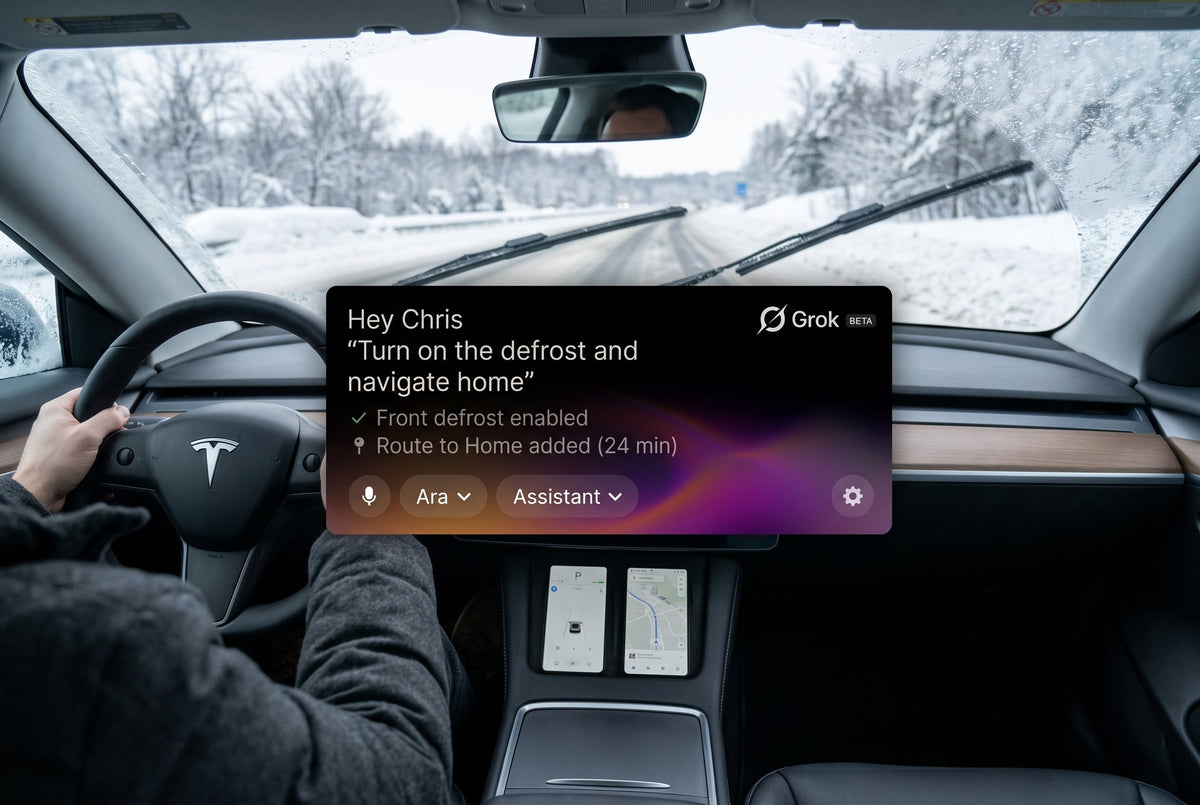
Grok executes compound instructions in parallel. You can state: "Turn on the defrost and navigate home." Grok splits the tokens, triggers the HVAC subsystem, and plots your route simultaneously.
4. Deep Vehicle Hardware Control
Grok connects directly with vehicle actuators and sub-modules. Commands like "Open the glovebox" or "Set wiper speed to high" bypass touchscreen submenus completely, delivering rapid physical utility when hands must remain on the yoke or wheel.
5. Conversational Multi-Stop Itineraries
Manually typing multiple waypoints onto a map can be tedious. With 2026.26, you can issue conversational chains: "Add a stop at the post office, then head to the gym, and finish at home." The system parses sequence order and constructs your complete route in seconds.
6. Contextual Corridor Routing
When planning spontaneous detours, precise addresses are unnecessary. Asking Grok: "Find coffee on the way home after the park" instructs the routing engine to analyze your transit vector and insert a high-rated charging or coffee stop directly along your return corridor, avoiding counterproductive back-tracking.
7. Interactive Diagnostic & Owner's Manual Queries
Instead of opening the glovebox or scrolling through the digital manual, you can query diagnostic alerts verbally. If a dashboard warning appears, ask: "What does the yellow tire symbol mean?" Grok retrieves the exact TPMS specifications, states cold tire pressure values for your wheel configuration, and offers to route to an air pump.
8. Live Supercharger Fleet Telemetry
Rather than panning across map clusters, Grok interfaces directly with Tesla's live charging network data. Asking: "How many stalls are open at the nearest Supercharger?" returns real-time available stall counts, peak kW output, and whether queue wait times are expected.
9. Geofenced Vehicle Reminders
Grok links reminders directly to vehicle GPS coordinates. Saying "Remind me to grab my gym bag when I get to work" flags the alert to trigger the moment your vehicle transitions into Park at the designated geofence.
10. Native Media Deep Linking
Media control extends far beyond basic play/pause toggles. In-cabin requests such as "Play my Summer Chill playlist on Apple Music" or "Shuffle synthwave on Spotify" interface natively with authenticated media apps, resolving library assets without manual UI navigation.
Grok Voice Assistant: Feature Pros & Cons
| Pros | Cons |
|---|---|
| True conversational natural-language parsing | Requires Premium Connectivity for real-time fleet queries |
| Eliminates touchscreen menu diving while driving | Slight response delay on legacy Intel Atom infotainment units |
| Native execution across vehicle hardware (wipers, glovebox) | Accidental wake-word activations can occur in noisy cabins |
Like what you've read? Subscribe to our newsletter and browse our best sellers for more info
Read more
The Ultimate Guide to Tesla’s 2026 Summer Update: Unlock Your Car’s Full Potential
Hello, Tesla owners! We are Jowua, your premium lifestyle partner. One of the most thrilling moments of owning a Tesla is waking up to an OTA (Over-The-Air) update notification. It’s that magical f...
Read more
Leave a comment
This site is protected by hCaptcha and the hCaptcha Privacy Policy and Terms of Service apply.