


Tesla Holiday Update 2025: Every New Feature (& How It Actually Helps Owners)
It’s that time of year again: Tesla’s 2025 Holiday Update is rolling out, and this year’s bundle mixes playful Toybox fun with some genuinely useful quality-of-life upgrades for daily driving, charging, and road tripping.
In this post, we’ll walk through every major feature in the update, how it works in the real world, and where to find it in your car’s menus. If you prefer watching, we’ve also covered this on our Jowua YouTube channel – but here’s the deep-dive you can skim while your car updates.

Grok with Navigation Commands (Beta): Your In-Car AI Guide
The headline feature of this update is deeper integration with Grok, Elon Musk’s AI assistant from xAI. Grok can now add and edit navigation destinations directly, turning it into a kind of “personal guide” while you drive.
What it does:
- Adds new stops to your current route
- Edits or removes destinations
- Lets you adjust routes in natural language instead of tapping around the map
How to use it:
- Open Grok in your Tesla
- Set its personality to Assistant (required for navigation commands)
- Use voice or text commands like “Add a Supercharger stop near Toronto” or “Remove the last destination”
Practically, this is great for road trips and multi-stop errands where the route changes on the fly. Just remember: it’s still beta, and availability may depend on your vehicle’s hardware and region.
Video Version
Watch our YouTube video covering the new update instead of reading the article:

Tesla Photobooth: Your Car as a Selfie Studio
Tesla leaned into the fun side with Tesla Photobooth, which turns your cabin camera into a tiny studio with filters, stickers, and emojis.
What it does:
- Lets you take selfies from inside your Tesla
- Add fun filters, stickers, and emojis on-screen
- Share the photos directly through the Tesla app
Where to find it: Toybox > Photobooth
It’s clearly a parked-only, just-for-fun feature, but if you’re on a road trip, at a Supercharger, or just hanging out in the driveway, it’s a nice way to make the car part of the memories.

Dog Mode Live Activity: Better Peace of Mind for Pet Owners
Dog Mode just got a huge usability boost for iPhone users. When it’s enabled, you’ll now see a Live Activity on your lock screen with:
- Periodic snapshots of your vehicle’s cabin
- Live temperature and climate information
- Battery status and other relevant conditions
Instead of constantly opening the Tesla app, you can glance at your lock screen to confirm that your pet is safe and comfortable while you’re away from the car.

Dashcam Viewer Upgrade: More Context in Your Clips
Dashcam clips now include extra metadata overlaid on the video:
- Vehicle speed
- Steering wheel angle
- Self-driving state (e.g., Autopilot/FSD)
This is especially helpful when reviewing incidents, sharing clips with insurance, or just trying to understand exactly what happened leading up to an event.

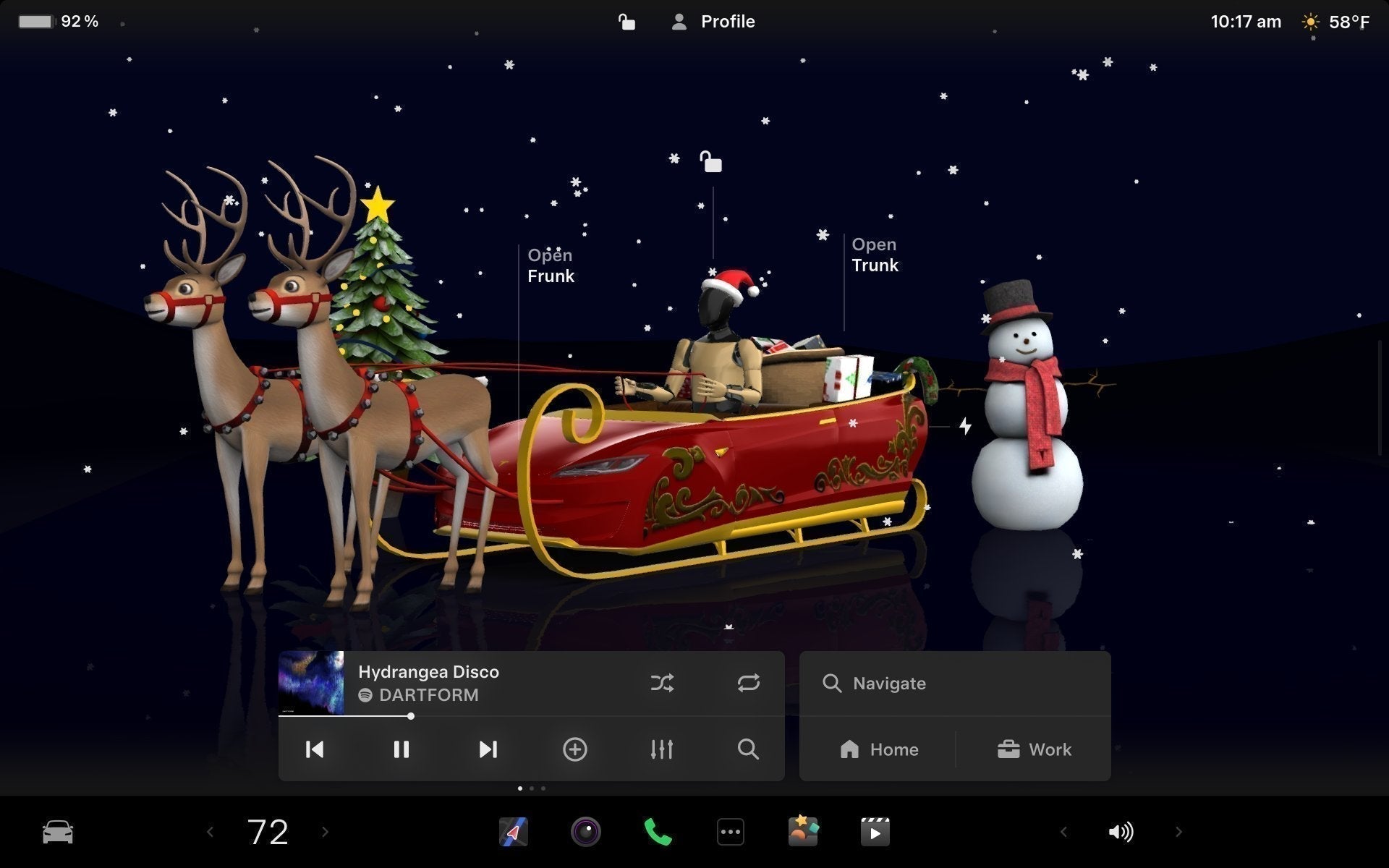
Santa Mode & Light Show: Holiday Vibes Turned Up
Santa Mode Refresh
Santa Mode gets new visuals and sounds this year:
- Festive snowmen and trees
- New holiday lock chime
- Snow effects for a more 3D, immersive look on the display
Where to find it: Toybox > Santa
Light Show: “Jingle Rush” & Scheduling
Tesla’s famous Light Show feature returns with a new show called Jingle Rush, plus a few important upgrades.
What’s new:
- New “Jingle Rush” light show sequence
- Schedule a show up to 10 minutes in advance
- Run it on a single car or sync it with friends’ vehicles
- Control interior lighting and screen color effects
- Create longer custom shows than before
If you’ve ever organized a multi-Tesla light show in a parking lot, this makes everything smoother and more flexible.

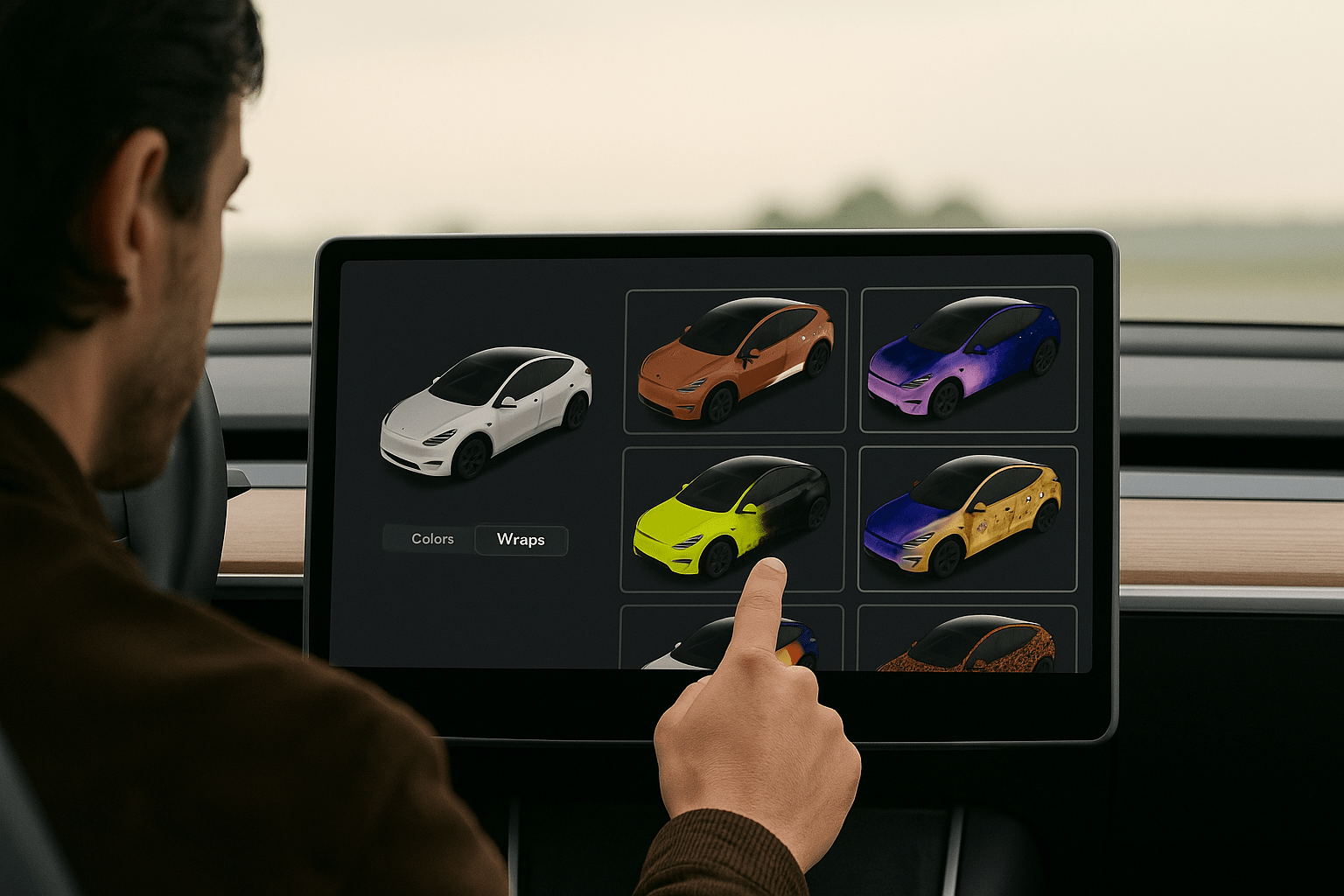
Paint Shop - Custom Wraps & License Plates (Avatar Only)
You can now personalize the on-screen avatar of your Tesla with:
- Window tints
- Custom wraps and colors
- Custom license plates
Where to find it: Toybox > Paint Shop
There are preloaded designs, but you can also create and upload your own via USB. This doesn’t change the physical car – it just makes the digital representation more “you” every time you glance at the screen.

Navigation Improvements: Smarter Favorites & Suggestions
The built-in navigation system gets some much-needed quality-of-life upgrades:
- Reorder navigation favorites to put your most-used places at the top
- Set Home or Work by dropping a pin anywhere on the map
- Suggested destinations based on your recent trips and habits while parked
None of these will blow anyone away individually, but together they shave off little bits of friction from daily driving, especially if you use Tesla navigation every day.

Supercharger 3D Site Map: See the Layout Before You Park
One of the coolest visual upgrades in this update is the new Supercharger Site Map feature. At select pilot locations, you can now see a 3D view of the station layout.
What it shows:
- A 3D layout of the Supercharger site
- Stalls marked as Available, Occupied, or Down
- Clearer understanding of how to enter and exit the site
When you navigate to one of these pilot Supercharger locations and arrive, the site layout and live occupancy will be displayed automatically.

Automatic HOV Lane Routing
For drivers in regions with carpool/high-occupancy vehicle lanes, Tesla can now automatically route you into HOV lanes when you’re eligible.
How it works:
- Uses information about your time of day, location, and road rules
- Factors in passenger count where applicable
- Adjusts your route to use HOV lanes when allowed
Where to enable it: Controls > Navigation > Use HOV Lanes

Phone Left Behind Chime
Ever had someone forget their phone on the wireless charger? The new Phone Left Behind Chime is built to solve exactly that.
What it does:
- Chimes a few seconds after the doors close if:
- A phone key is detected in the cabin, or
- A phone is left on the wireless charger
- Only triggers when no occupants are detected in the vehicle
Phone key detection requires UWB-supported devices, so availability depends on your phone hardware.
Where to find it: Controls > Locks > Phone Left Behind Chime

Charge Limit per Location: Smarter Charging Rules
You can now save a charge limit per location. That means your car can automatically apply different limits depending on where you’re plugged in.
Example setups:
- Home: 70–80% for long-term battery health
- Work: 60% if you’re just topping up
- Road trip stop or Supercharger: 90–100% as needed
Where to set it: Controls > Charging

SpaceX ISS Docking Simulator: Arcade Goes Orbital
In the Arcade, there’s a new game: the @SpaceX ISS Docking Simulator. It’s a 3D docking simulator based on actual NASA-style interfaces.
Where to find it: Arcade > SpaceX ISS Docking Simulator
Like most Arcade features, it’s meant for when the car is parked—great for passing time while charging or waiting for someone.
Other Small but Useful Tweaks
The holiday update also includes a handful of smaller improvements:
- Wireless phone charging pads toggle: Enable or disable them in Controls > Charging (S3XY) or Controls > Outlets & Mods (Cybertruck).
- Better Spotify experience: Add tracks to your queue from the search screen and scroll large playlists, albums, podcasts, and audiobooks without paging.
- Rave Cave with rainbow colors: Accent lights change color along with the beat via App Launcher > Toybox > Light Sync.
- Tron-inspired Lock Sound: A new “Light Cycle” lock sound in Toybox > Boombox > Lock Sound.
As always, exact feature availability depends on your vehicle hardware and region, so you may not see every single item in your own release notes.
Final Thoughts: Is the 2025 Holiday Update a Big Deal?
Tesla’s 2025 Holiday Update isn’t about one giant headline feature—it’s about a collection of smaller upgrades that make everyday ownership smoother and more fun. Grok navigation commands, better Dog Mode visibility, Supercharger 3D maps, smarter charging, and HOV routing are the practical standouts.
On the fun side, Photobooth, Santa Mode upgrades, Jingle Rush, and the ISS Docking Simulator keep the “Tesla personality” alive and well.
At Jowua, we love these updates because they’re exactly where the combination of software and hardware shines. If you want to get even more out of your Tesla, from organization to road-trip accessories, check out our latest gear and guides.

Commenta
Questo sito è protetto da hCaptcha e applica le Norme sulla privacy e i Termini di servizio di hCaptcha.